
HESCO Bill Check Online September 2026 | View and Print Duplicate Bill Now
If you live in Sindh and your electricity connection is with HESCO (Hyderabad Electric Supply Company), you've probably noticed that your bill copy doesn't arrive at home on time. Because of this, there's always the fear of late payment surcharges or hefty fines. But now you don't need to worry at all. You can now check and pay your latest September 2026 HESCO bill online from home. You just need to enter your 14-digit reference number or your 10-digit consumer ID in the toolbox provided and click “Check Now.” Your latest bill will open directly on the official site, where you can print or download it and keep it safe.
Additionally, you can apply for a subsidy to get relief on your HESCO bills. Below, you'll find detailed information on how to register for this program so you can explore it. You can check your bill here completely free of charge, and you don't need to log in or sign up for this.
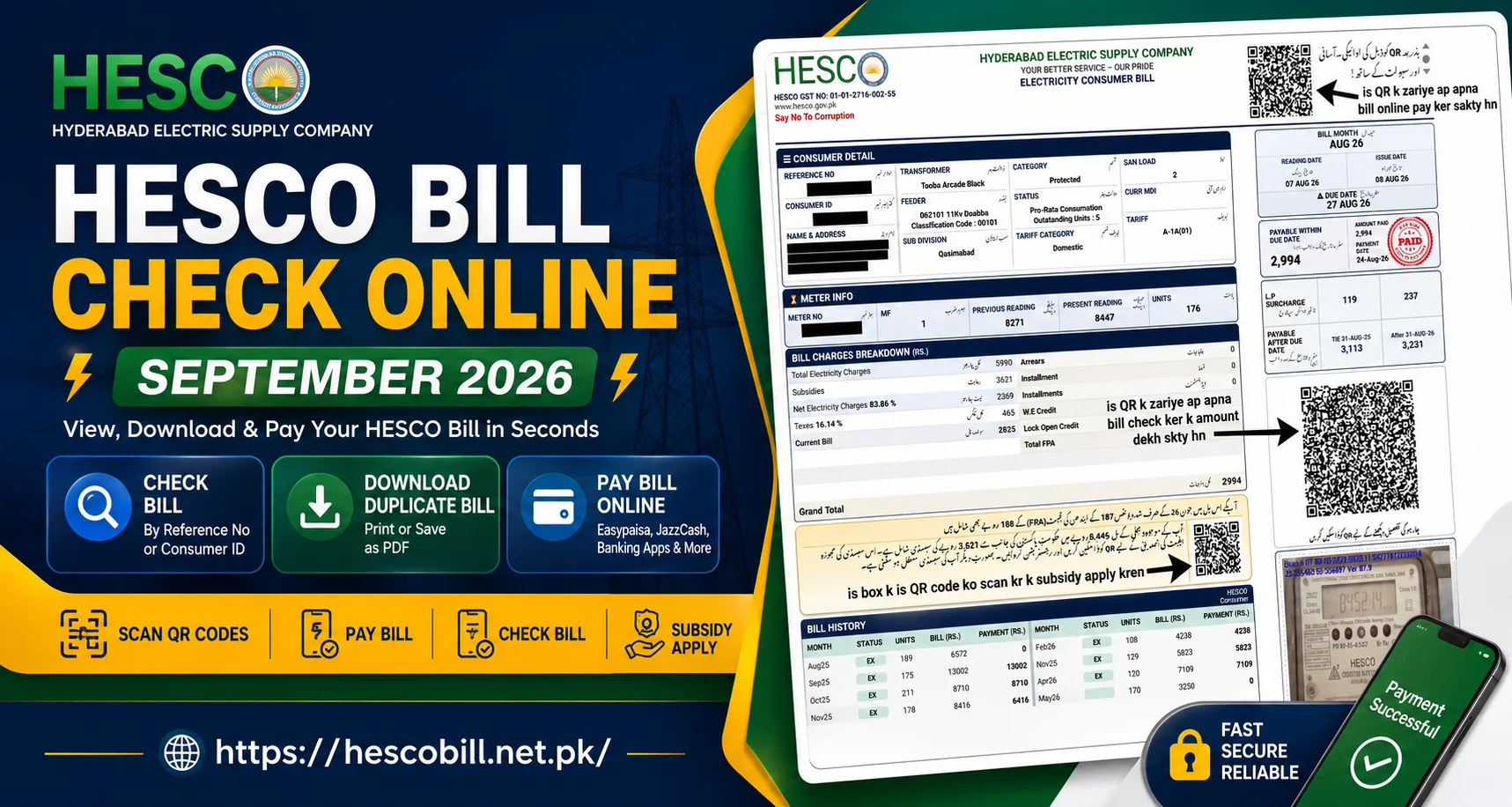
How to Check HESCO Bill Online
Checking your HESCO bill online is very simple and easy. If this is your first time checking your bill online, don't worry at all. Just follow the short and simple steps provided exactly as they are, and in just a few seconds, you will see your bill amount on your phone screen.
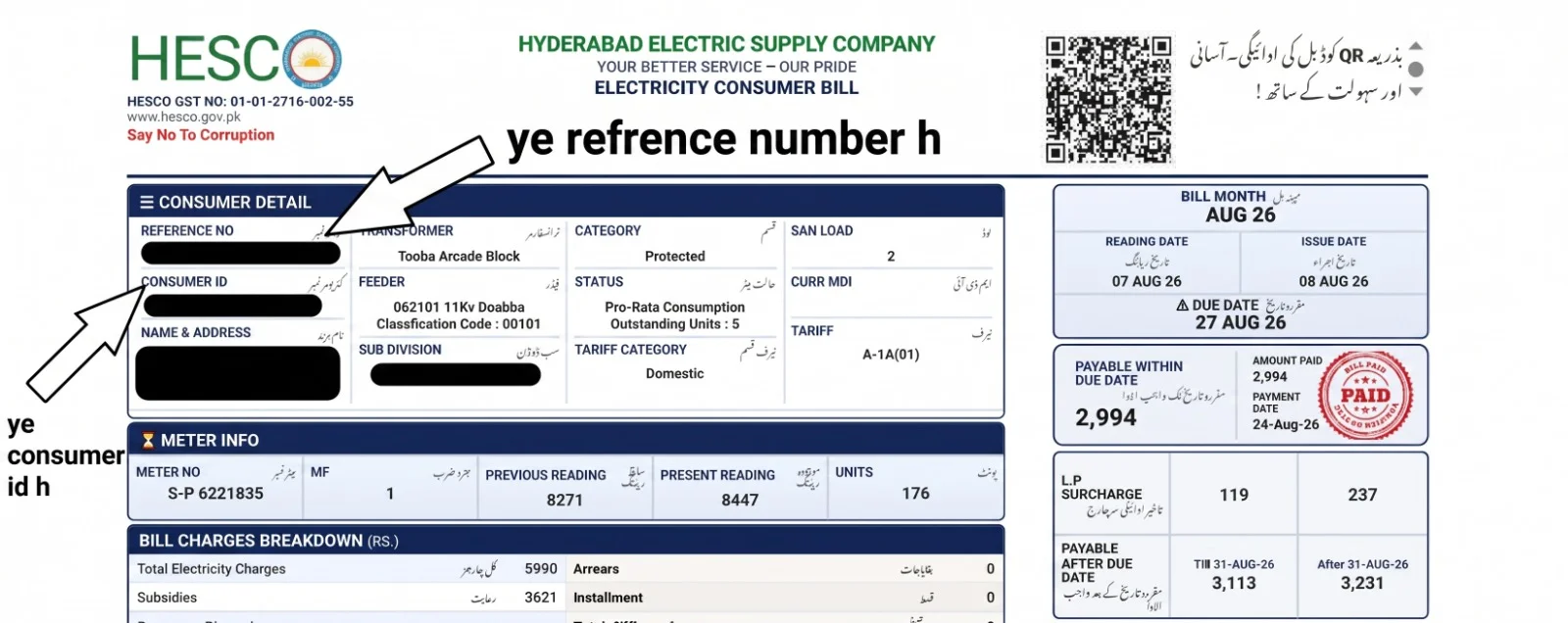
Enter Your Reference Number
Enter Your Consumer ID
Download or Print Your Bill
It is very easy to save your HESCO bill online, and if you have it, it has many benefits. This is because HESCO officers can arrive unexpectedly and will check your previous month's bill to see if there are any issues with your meter or units. You can easily save your bill for safekeeping this way, and you can also print a copy of it instantly when needed.
HESCO Bill QR Codes Explained
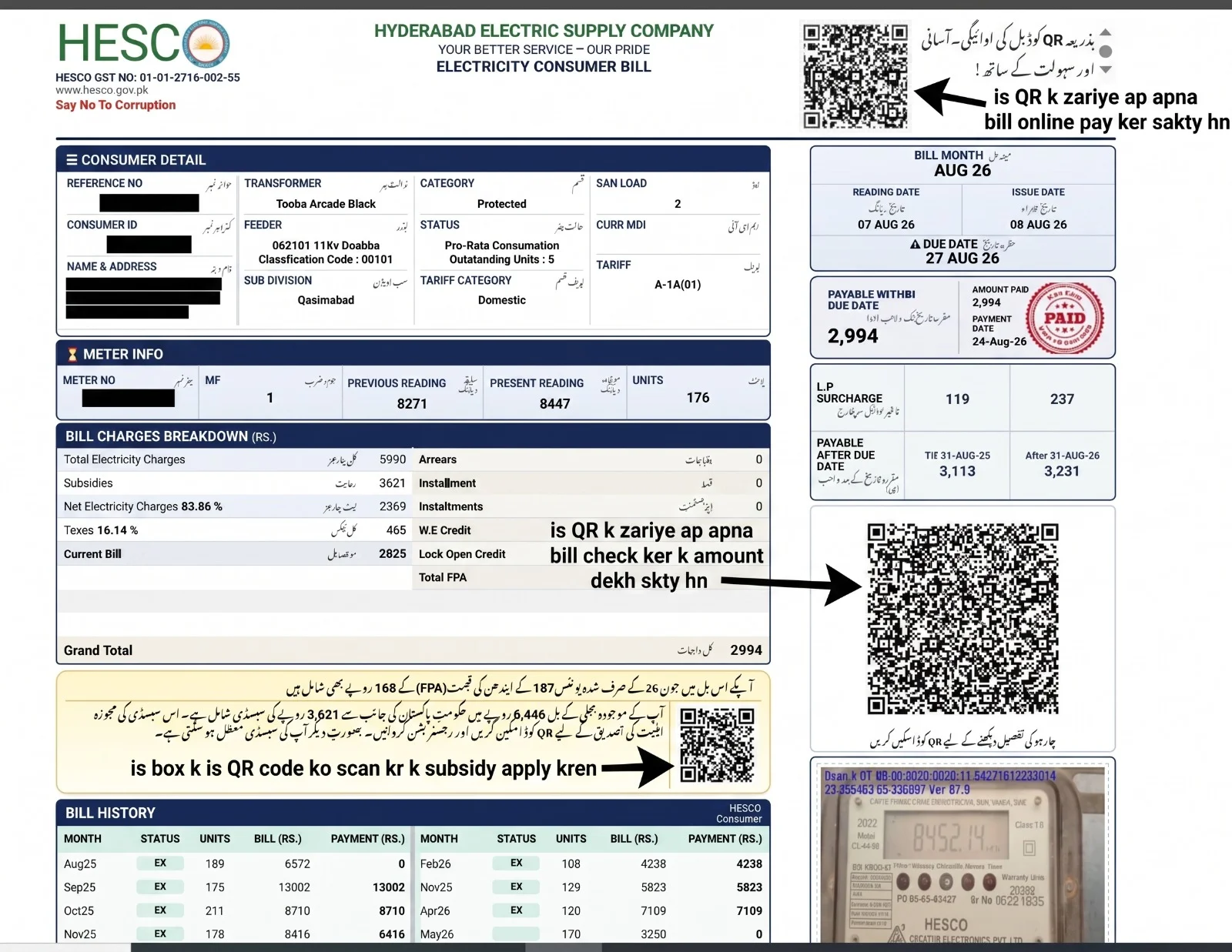
Hesco has now added 3 QR codes to its bills for the convenience of its consumers, through which you can check your bill, pay, and apply for subsidies easily. You don't need to go to any office or ask for the procedure. For your convenience, we have detailed each QR code here with its specific function and the steps to use it on your bills. In addition, we have also provided a picture below to guide you. Explained so that you have no trouble. Additionally, if you use them correctly, you can save a lot of time and effort and protect yourself from all kinds of fraud.
QR Code for Paying Your Bill
QR Code to Check Your Bill
QR Code for Subsidy Registration
You can easily apply for the government's subsidy programs through this. However, you are only eligible for this scheme if you have been using fewer than 200 units per month consistently. Only then will you receive the relief.
HESCO Bill Payment Methods
HESCO has now made the process of paying electricity bills very easy and secure for its users. Consumers no longer need to spend hours standing in long bank lines to pay their bills. You can pay your bill from home on your mobile phone in seconds. In accordance with government and state bank guidelines, you now also receive an instant digital receipt for all digital payment methods, which serves as proof that your bill has been paid. Below, we have detailed each method step-by-step so that you encounter no difficulties.
Pay HESCO Bill Online
Pay Through Mobile Banking
Pay Through Banks and ATMs
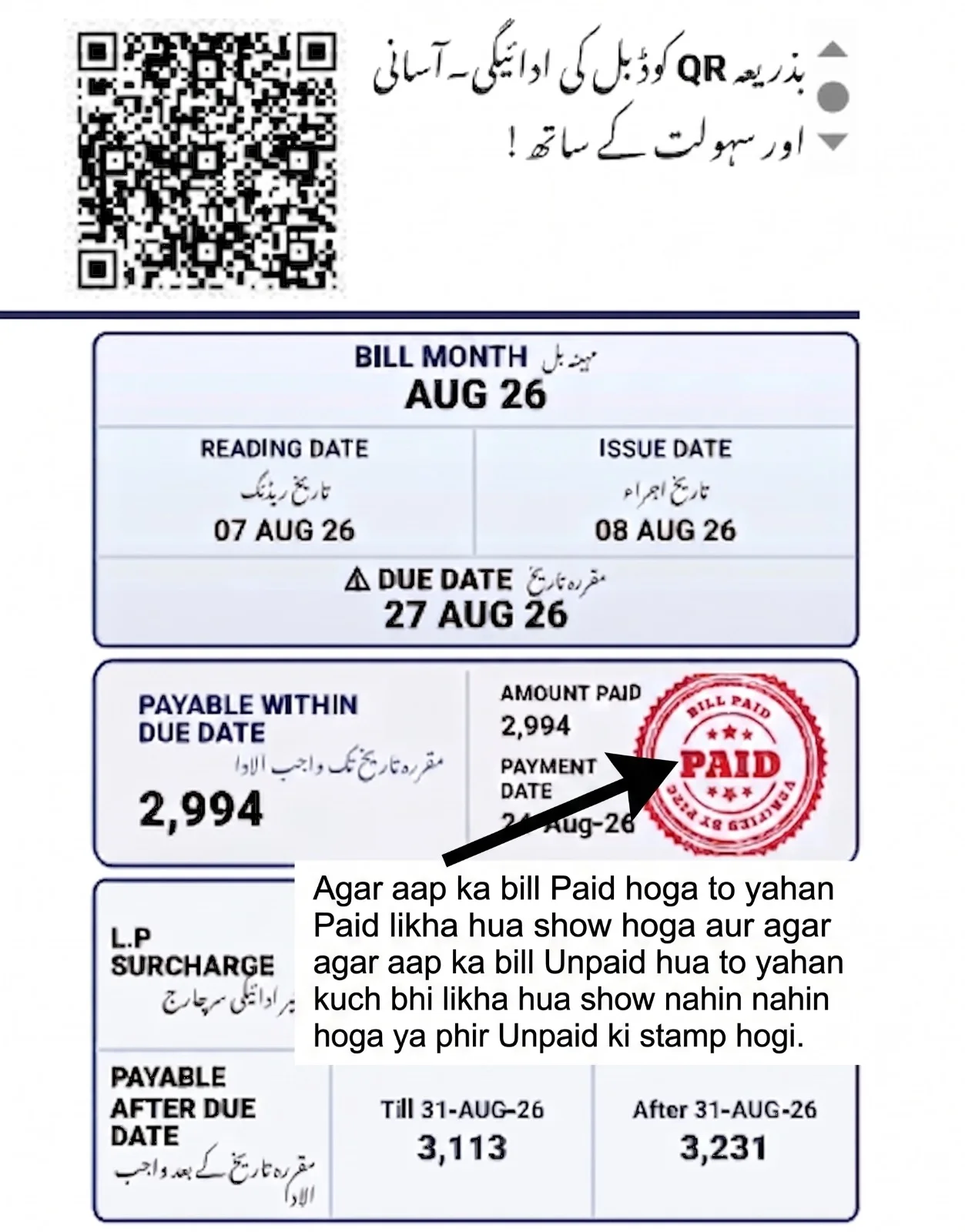
How to Check If Your HESCO Bill is Paid or Unpaid
When you pay a bill from your mobile wallet EasyPaisa/JazzCash or any bank, it is important to check afterward whether the bill's status is now paid or unpaid. If you don't check, it's possible that your next month's bill could be double due to a small mistake. Therefore, it's essential to be cautious before any loss occurs. However, you should wait 24 to 48 hours. If, after checking, it still shows as unpaid, don't worry at all. follow the advice given.
HESCO Peak Hours Timings – Secrets to Reduce Your Electricity Bill
Under HESCO's new electricity tariff rules, rates across Sindh have now been divided into two categories. The first one is Peak Hours, and the second one is Off-Peak Hours. Peak Hours are the critical evening periods when electricity demand in all of Pakistan is at its highest, prompting NEPRA to significantly increase the per-unit rate during this time. If you have a 3-phase meter installed, using electricity during these specific hours can double your bill compared to normal days. Therefore, if you want to cut your monthly bill in half, you need to know the changing peak times throughout the year so you can turn off heavy appliances. Along with this, we have also given you some great tips. If you follow them, you will see a noticeable reduction in your bills, which will surprise you.
| Months / Season | Peak Hours Timing | Off-Peak Hours Timing |
|---|---|---|
| December to February (Winter) | 5:00 PM to 9:00 PM | 9:00 PM to 5:00 PM (Next Day) |
| March to May (Spring) | 6:00 PM to 10:00 PM | 10:00 PM to 6:00 PM (Next Day) |
| June to August (Summer) | 7:00 PM to 11:00 PM | 11:00 PM to 7:00 PM (Next Day) |
| September to November (Autumn) | 6:00 PM to 10:00 PM | 10:00 PM to 6:00 PM (Next Day) |
How to Reduce Electricity Consumption During Peak Hours
If you take a few precautions during peak hours, you can save thousands of rupees on your home's bill. To do this, just follow the easy tips given below:
HESCO Area of Operations: Districts and Cities Served
HESCO supplies electricity not only in Karachi but also in approximately 13 major districts across Sindh. To improve power delivery, this entire network has been divided into four major circles so that consumers can receive electricity reliably. If you live in any of the areas or cities listed below, you can easily check your duplicate bill completely free using our tool.
| Operation Circle | Covered Divisions | Main Cities and Areas Served |
|---|---|---|
| Hyderabad Circle | Qasimabad, Latifabad, Tando Allahyar | Hyderabad City, Qasimabad, Latifabad, Tando Allahyar, Gari Khata, Hirabad, Phuleli |
| Laar Circle | Kotri, Badin, TM Khan, Thatta | Kotri, Jamshoro, Sehwan, Thatta, Badin, Sujawal, Nooriabad, Matli |
| Nawabshah Circle | Nawabshah, Sanghar, Tando Adam | Nawabshah City, Sakrand, Kazi Ahmed, Sanghar, Shahpur Chakar, Jhole |
| Mirpurkhas Circle | Mirpurkhas, Digri, Samaro | Mirpurkhas City, Digri, Mithi, Tharparkar, Umarkot, Kunri, Jhudo |
HESCO Bill Charges and Taxes: Why Is Your Bill So High?
HESCO bills include not only the cost of the units you've used but also various taxes and surcharges imposed by the government and NEPRA. Many consumers don't realize why their bill is higher than they expected, because these extra charges are hidden at the end of the bill. It's important to understand these charges in simple terms, so you know where your hard-earned money is going. Below, we've explained all the key taxes on your bill in very short, easy-to-understand language.
What Information Is Shown on a HESCO Bill
When you check your HESCO online bill, it is important for every consumer to understand all the information provided on it so they can easily assess the connection and charges and see what has been added. Below is a brief explanation of the key information on the bill so you can understand it in simple terms.
HESCO Bill Problems and Solutions: Quick Fixes
Often, when consumers check their hescobill online, the portal shows “bill not found,” and they get worried, wondering why this happened. There are some very important reasons why you sometimes encounter this error, but now you don't need to worry about it anymore just follow the instructions provided and you will never face this problem again.
How to Contact HESCO: Customer Support & Complaints
If you need to file an important complaint regarding your electricity bill, meter malfunction, or a power outage, HESCO has provided multiple support contacts for its customers. You can call the helpline from home or register your billing complaint through the online portal so that your issue can be resolved as quickly as possible. Below are easy ways to contact official support.
Frequently Asked Questions About HESCO Bill
Q1: How can I check my HESCO bill online for 2026?
Ans: You can easily check your latest bill for September 2026 NOW by entering your 14-digit reference number or 10-digit consumer ID in the search tool on our website.
Q2: Where can I find the 14-digit reference number for the HESCO online bill check?
Ans: This 14-digit number is written on the first line in the “CONSUMER DETAIL” box in the top-left corner of your old or new hescobill.
Q3: Is there an official www.HESCO bill online portal for duplicate downloads?
Ans: Yes, when you enter the details in our tool and click “Check,” the system takes you directly to the official PITC and HESCO portal, where your duplicate bill is displayed so you can download it.
Q4: How to check HESCO bill online by reference number without spaces?
Ans: To check your bill, you must enter the 14-digit reference number without any spaces, dashes (-), or special characters into our input box. Only then will your latest bill be displayed.
Q5: How can I check my HESCO bill history for previous months?
Ans: On your HESCObill, look for the “Bill History” section in the lower middle-left box. There, you can easily view your printed records for the previous 12 months.
Q6: What is the process for checking HESCO bills online for Hyderabad or other Sindh districts?
Ans: The process is exactly the same for everyone; whether you are from Hyderabad, Laar, Nawabshah, or Mirpurkhas, you can check any bill in Sindh using this single tool by entering the reference number.
Conclusion
The new digital system for checking, viewing, and downloading HESCO bills online is an excellent convenience for consumers, allowing you to save both your valuable time and late fee surcharges. The use of QR codes and mobile banking payments, in line with the new 2026 layout, has made this entire process even easier and more secure. If you notice an over-reading on your bill or any tax-related issue, be sure to contact the helpline or your local sub-division office before the due date.
All the information provided here is completely accurate. We've included only the real details that officials and the government have put on our bills for our convenience. We are not an official site. Our only job is to guide you through the correct method. In addition by following this complete guide, you can not only submit your bill on time but also manage your electricity costs with smart tips. If you still don't understand any step, you can ask us in the comment box below. We will do our best to reply promptly and immediately address and resolve your issue.